
Автоматична обработка на продуктови снимки — готови за качване.
Automated product photo processing — ready to upload.
Windows приложение за e-commerce екипи и студиа. Сканираш код, снимаш или импортваш кадри — приложението премахва фона, центрира продукта и експортира готови файлове за магазин или каталог.
A Windows desktop app for e-commerce teams and studios. Scan a product code, capture or import photos — the app removes the background, centers the subject, and exports upload-ready files for your store or catalog.
- Еднакъв вид на каталога чрез crop, centering и export presets
- Подходящо за high-volume workflows
- Обработката е локална — снимките не се качват онлайн
- Consistent catalog look through crop, centering, and export presets
- Built for high-volume workflows
- Local processing — photos are never uploaded automatically
Как работи
How it works
Създаден за повтаряеми product photo workflows — поема бавната, ръчна стъпка от обработката.
Built for repeatable product photo workflows — it takes over the slow, manual part of image preparation.
Избираш продукт
Select a product
Сканираш barcode или въвеждаш product code, за да започнеш работна сесия за конкретен артикул.
Scan a barcode or enter a product code to start a working session for a specific item.
Снимаш или импортваш
Capture or import
Кадрите идват от live shooting / tether workflow или от вече заснети изображения.
Images can come from a live tether workflow or from already captured product shots.
Автоматична обработка
Automatic processing
Приложението премахва фона, изрязва и центрира продукта според избрания профил.
The app removes the background, crops, and centers the subject based on the selected profile.
Готов export
Ready export
Получаваш файлове в различни формати и размери за marketplace, платформа или каталог.
You get files in multiple formats and sizes for a marketplace, e-commerce platform, or catalog.
Новото в ShotFactory
What's new in ShotFactory
Последните добавки в приложението, все още се разработват активно.
Recent additions to the app — still being actively developed.
Стъклени и прозрачни продукти
Glass and transparent products
Нов режим на обработка (two-background matting) за чаши, бутилки и други прозрачни/отразяващи продукти, при които обикновеното премахване на фона не се справя добре. Изчислява реална прозрачност от два калибрирани кадъра, вместо да гадае с AI по една снимка.
A new processing mode (two-background matting) for glasses, bottles, and other transparent or reflective products where standard background removal struggles. It computes real transparency from two calibrated exposures instead of guessing from a single AI pass.
Автоматично разпознаване на камера
Automatic camera detection
Свързваш Canon или Sony камера и приложението разпознава коя е автоматично — не се налага ръчен избор. Показва само подходящите за конкретната камера опции (например 360° записа само при Sony).
Connect a Canon or Sony camera and the app detects which one automatically — no manual selection needed. It shows only the options relevant to that camera (for example, 360° recording only for Sony).
360° продуктова фотография
360° product photography
Заснемане с камера на статив/въртяща маса и автоматично извличане на кадрите — всеки от тях минава през същата автоматична обработка, готов за 360° изгледи в магазина.
Tethered capture on a turntable with automatic frame extraction — every frame goes through the same automatic processing, ready for 360° views in your store.
Ръчни корекции и тъмна тема
Manual corrections and dark theme
Нови плъзгачи за острота, топлина на цвета и наситеност върху всеки кадър, плюс преработен, по-бърз интерфейс с превключваема тъмна тема.
New sliders for sharpening, warmth, and saturation on every frame, plus a redesigned, faster interface with a switchable dark theme.
За кого е подходящо
Who it's built for
E-commerce екипи
E-commerce teams
Resellers и онлайн магазини с голям обем артикули, при които ръчната обработка кадър по кадър е бавна и скъпа.
Resellers and online stores with high product volume where manual image editing frame by frame is slow and expensive.
Каталожни студиа
Catalog studios
Студиа с повтаряем setup, при които консистентността на изхода е по-важна от индивидуалния ретуш.
Studios with a consistent setup where output uniformity matters more than individual retouching.
Volume workflows
Volume workflows
Работи най-добре при контролирана светлина и подреден процес — не се представя като решение за всеки сценарий.
Works best in controlled lighting with a consistent setup — not presented as a fix for every scenario.
Екрани от приложението
Application screens
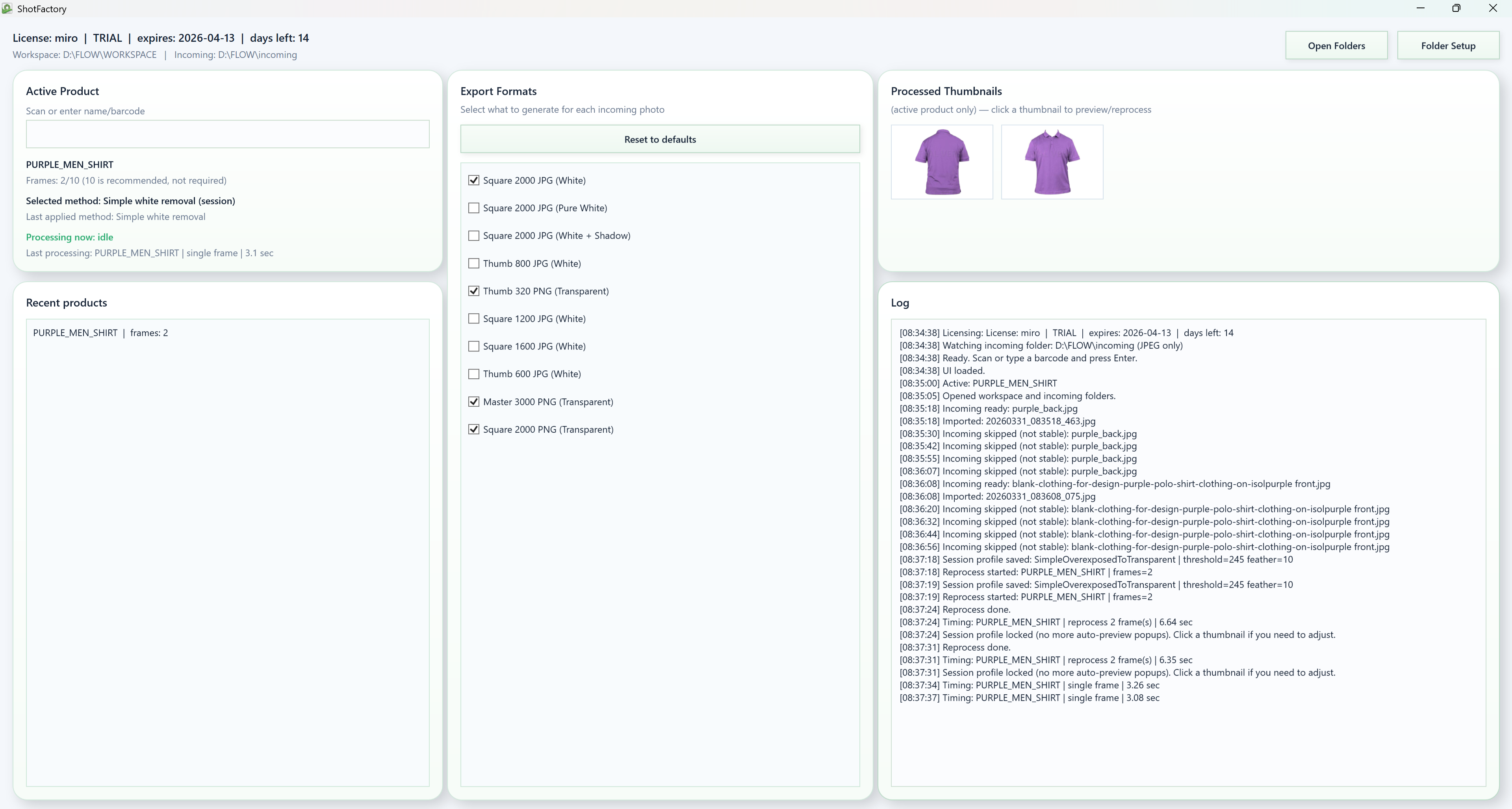
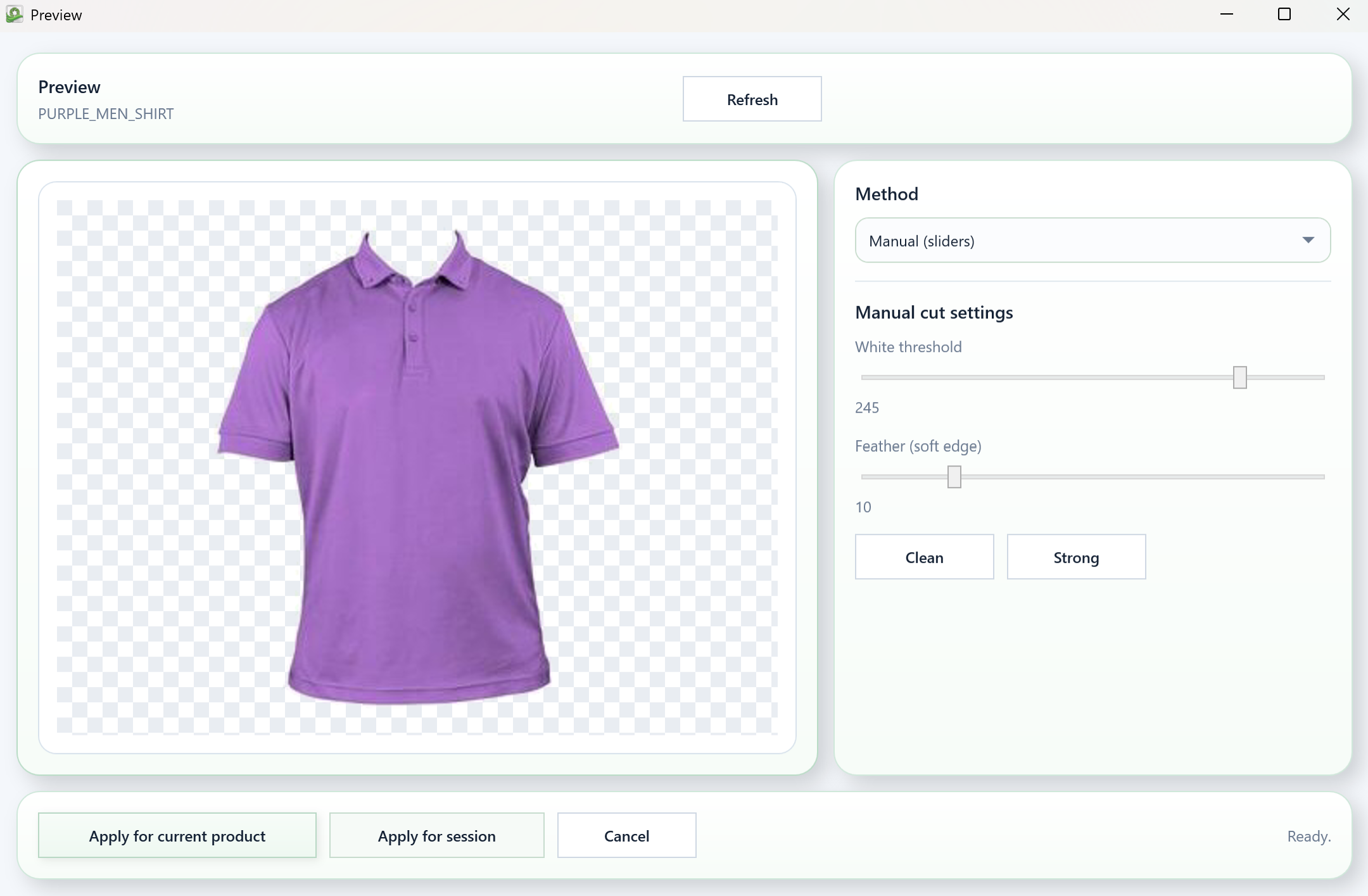
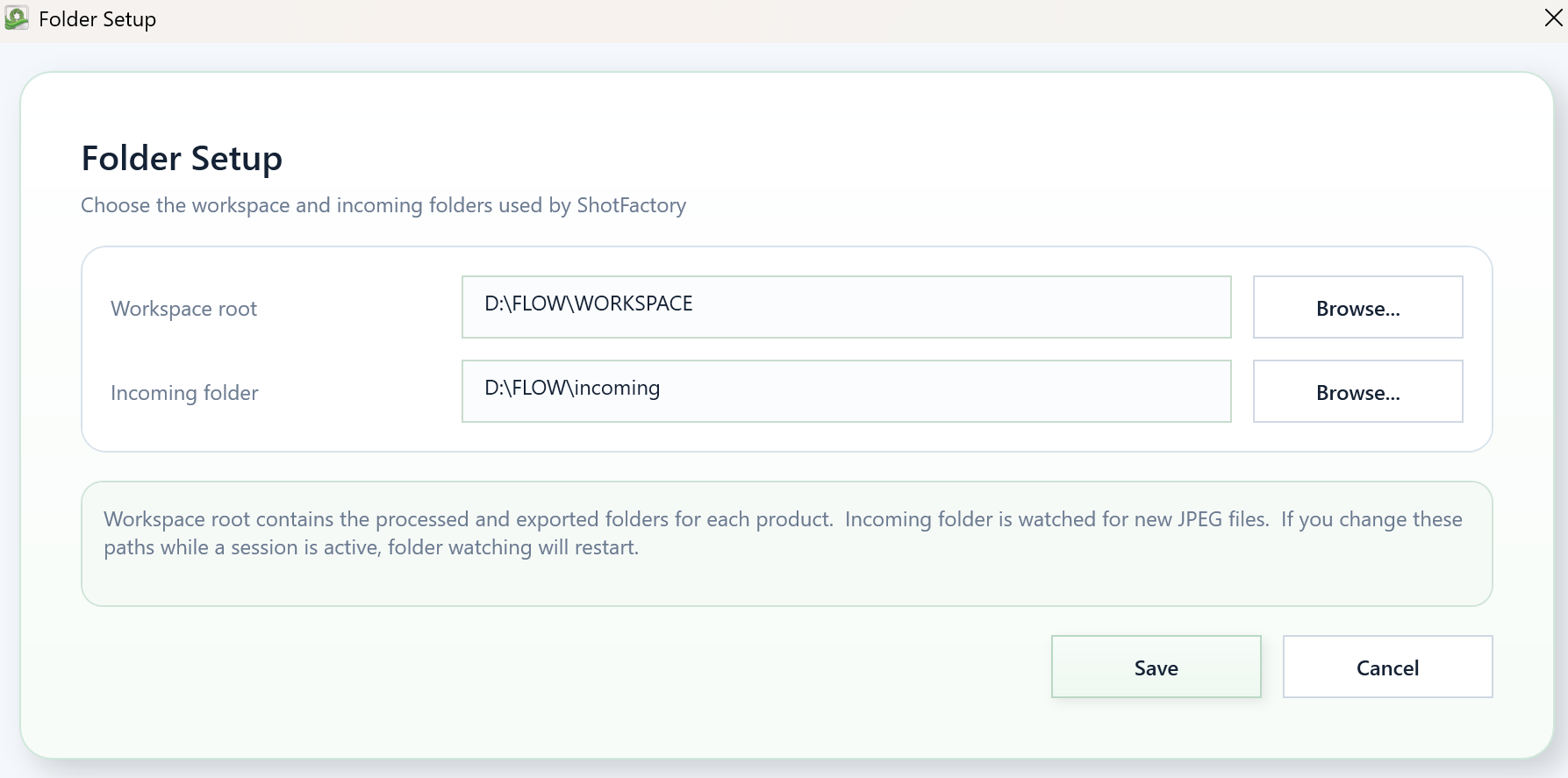
Реални screenshots от текущия светъл интерфейс на ShotFactory.
Real screenshots from the current light ShotFactory interface.
Главен екран
Main window
Preview и ръчни настройки
Preview and manual controls
Настройка на папките
Folder setup
Как да получиш копие
How to get a copy
- Windows desktop app — инсталира се локално, като MSIXBUNDLE.
- Достъпно по заявка — приложението се разработва активно, копие се предоставя индивидуално.
- Локална обработка — снимките не се качват автоматично никъде.
- Install стъпките се обясняват директно при заявката, включително при Windows предупреждение.
- Windows desktop app — installed locally, as an MSIXBUNDLE.
- Available by request — the app is under active development; a copy is provided individually.
- Local processing — photos are not automatically uploaded anywhere.
- Install steps explained directly when you request a copy, including any Windows warning.
Следваща стъпка
Next step
Заяви копие и тествай с реални собствени снимки.
Request a copy and test it with your own real product images.
Въпроси
FAQ
За кого е?
Who is it for?
За resellers, e-commerce екипи, каталожни студиа и бизнеси с много продуктови снимки на месец.
For resellers, e-commerce teams, catalog studios, and businesses processing many product images monthly.
Browser tool ли е?
Is it a browser tool?
Не. Десктоп приложение за Windows, което се инсталира локално на компютъра.
No. It is a locally installed Windows desktop application.
Кога работи най-добре?
When does it work best?
При контролирана светлина и подреден, повтаряем setup. Не е универсално решение за всеки тип снимка.
In controlled lighting with a consistent, repeatable setup. It is not a universal fix for every type of product image.
Работи ли със стъкло и отразяващи повърхности?
Does it work with glass and reflective surfaces?
Има нов beta режим (two-background matting) точно за това — виж Новото. Все още се тества, така че най-добрият начин да провериш с твоите конкретни продукти е да заявиш копие.
There's a new beta mode (two-background matting) built specifically for this — see What's new. It's still being tested, so the best way to verify with your specific products is to request a copy.
Контакт
Contact
Въпроси за копие, инсталация, лицензиране или дали ShotFactory пасва на твоя workflow — пиши директно.
Questions about getting a copy, installation, licensing, or whether ShotFactory fits your workflow — reach out directly.
 HRUM STUDIO